
Contact Us
Didn't get your welcome email?
Your payment method may be linked to a different email address than the one you expected. Please check your other inboxes, and if you use Gmail, take a look in your Promotions tab.
Cancel My SubscriptionOpen for step-by-step cancellation instructions.ShowHide
Purchased after January 30, 2026
- Log in at www.teacherpreps.com/login, then click My Account in the top navigation.
- Click the Billing tab.
- Click the large red Cancel My Subscription button.
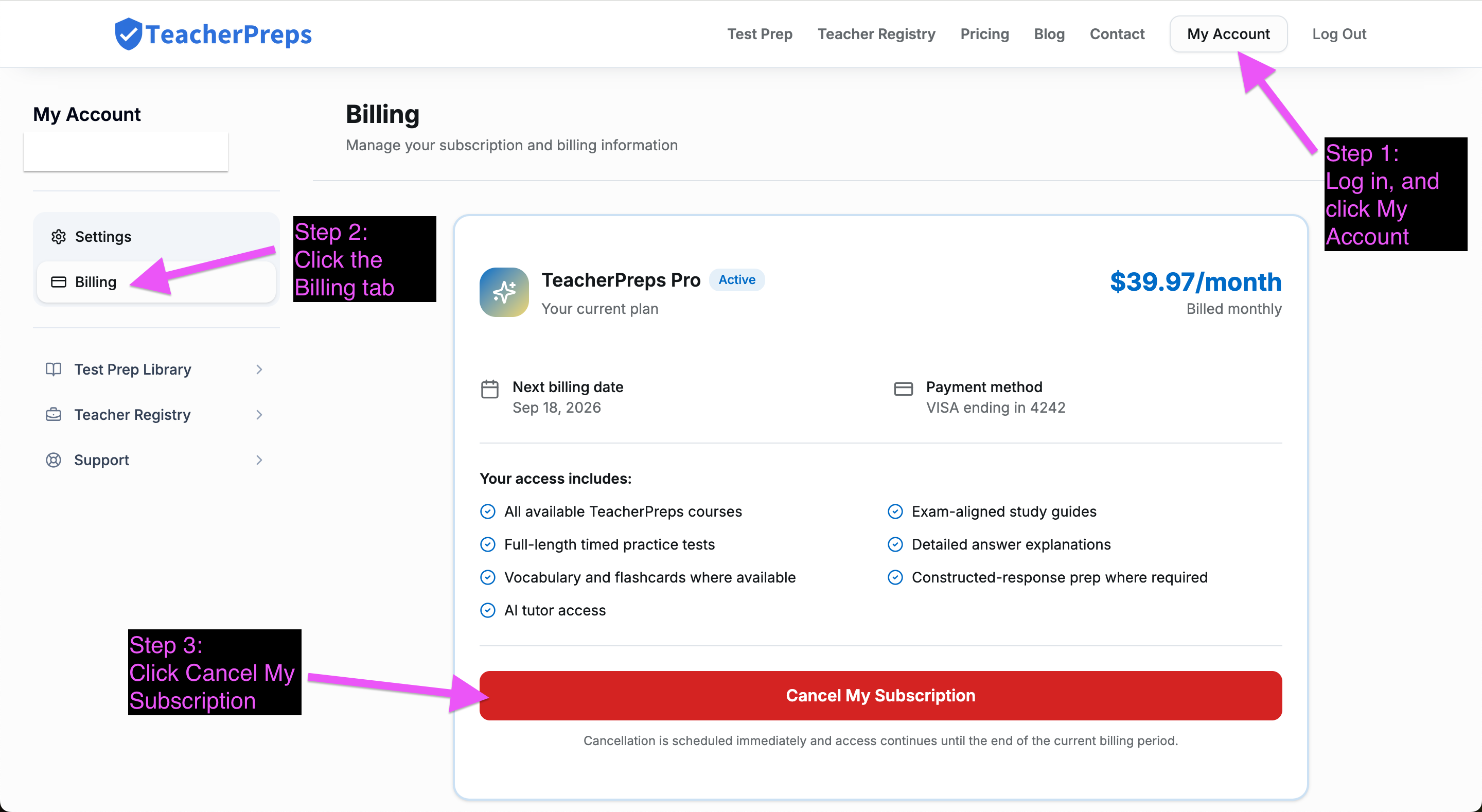
Cancellation is scheduled immediately. You keep access through the end of your current paid billing period and you will not be billed again.
Purchased before January 30, 2026
Use the legacy subscription manager: Manage Your Subscription (Legacy).
Helpful Links
TeacherPreps launched a brand new learning platform (the one you're at now) on January 30, 2026. Please refer to the links below for common requests to help you get situated faster.
Purchased before January 30, 2026
Purchased after January 30, 2026
Need more support? Email directly at support@teacherpreps.com
TeacherPreps.com is not affiliated with or endorsed by any testing organization. All organizational and test names are trademarks of their respective owners.